Book a demo
Rather see it with your own leads? We set up your request page from your website on the call. You leave with it live.
Watch the demo videos
One short video for each feature, so you can watch just the part you care about. Each runs 2 to 4 minutes, with captions on screen. Real app screens, made-up people.
On your own
Read what this video shows
Don't have a website? EliteReply gives you a page with your services and your form for instant booking. Booking is instant only for clients who fit, based on your rules. Everyone else gets a reply instead. Share that link anywhere you get client requests, like LinkedIn, and turn visitors into scoped, qualified leads. On LinkedIn, add a Book an appointment or View my services button. It opens your request page. Have a website? Any button on it can open the same form. Just paste one line of code. Someone else runs your site? Copy the instructions for them, or for your AI website builder. Turn your website into a lead generation engine, not just traffic for info. A visitor clicks Book a consultation. Your form opens right on your site. Tom Hollis runs a landscaping company. He writes four words: We need help growing. He picks the service, his budget and when he wants to start. Rota reads it and asks what the form left out. Tom taps an answer. He could also write his own words. Rota checks the request against your rules. It's a fit. Your calendar unlocks right in the form, so Tom can pick a time. Dan Walsh taps Contact us on his phone. He wants to pick your brain over lunch, for free. That's not a fit, so no calendar. The form tells him you'll reply by email. Dan is Not a fit, with the reason. Tom is Ready.
Read what this video shows
A consultant opens a new lead and finds a reply already drafted by Rota, the AI assistant. The consultant reads it, edits it and sends it under their own name, and nothing goes out on its own. Drafts follow the consultant's tone from two or three emails they paste in, and each lead shows how fast they first replied, counted only in working hours. For leads that aren't a fit, the consultant writes a closing reply once, then sends it with one tap and a few seconds to undo. When the consultant needs more details, Rota drafts questions too, and the client answers them on their own page.
Read what this video shows
After a client comes to the call, the consultant sends a proposal right from the lead. The proposal starts from the client's request and the consultant's starting price, and the consultant can edit it and add a deposit, a start date and how long it stays open. The consultant previews it exactly as the client will see it, then sends it. The client reads it on their own page and accepts by paying the deposit by card on Stripe's page, and the money goes to the consultant's own Stripe account. The lead then shows it as accepted and paid, the consultant can refund the deposit in full, and if a client doesn't answer, a nudge is drafted to send once.
Read what this video shows
When a consultant finishes work for a happy client, a ready-made referral ask is drafted for the consultant to read and send. The client gets a page to pass the consultant's link to a friend by email, text or a copied message, and the friend's request arrives Ready with the client's name and note on it. Review asks are drafted too, and past clients can be added by pasting names, uploading a CSV or picking from Google Contacts, with an ask drafted for each one. For work the consultant doesn't take, the Not a fit reply can name a trusted partner, but nothing is shared unless the client says yes. A referrals page shows what referred clients agreed to in dollars and the deposits paid, and after three referred clients are hired, it also shows the consultant's cost and return.
Read what this video shows
A consultant already uses other tools, and EliteReply works with their calendar, ChatGPT, Claude, HubSpot, Stripe and Google Contacts. With Calendly or Cal.com connected, booked, moved and canceled calls show on the lead, and a Google Calendar or any booking link can show on the request page. In ChatGPT or Claude, the consultant can ask which leads need a reply and get a draft from Rota, the AI assistant, but sending stays off until the consultant turns it on, and even then it asks first. HubSpot gets each lead with its verdict and reason, Stripe takes card deposits into the consultant's own account, and Google Contacts lets the consultant tick past clients so a referral ask is drafted for each. Gemini and Copilot are shown as coming soon.
For firms and agencies
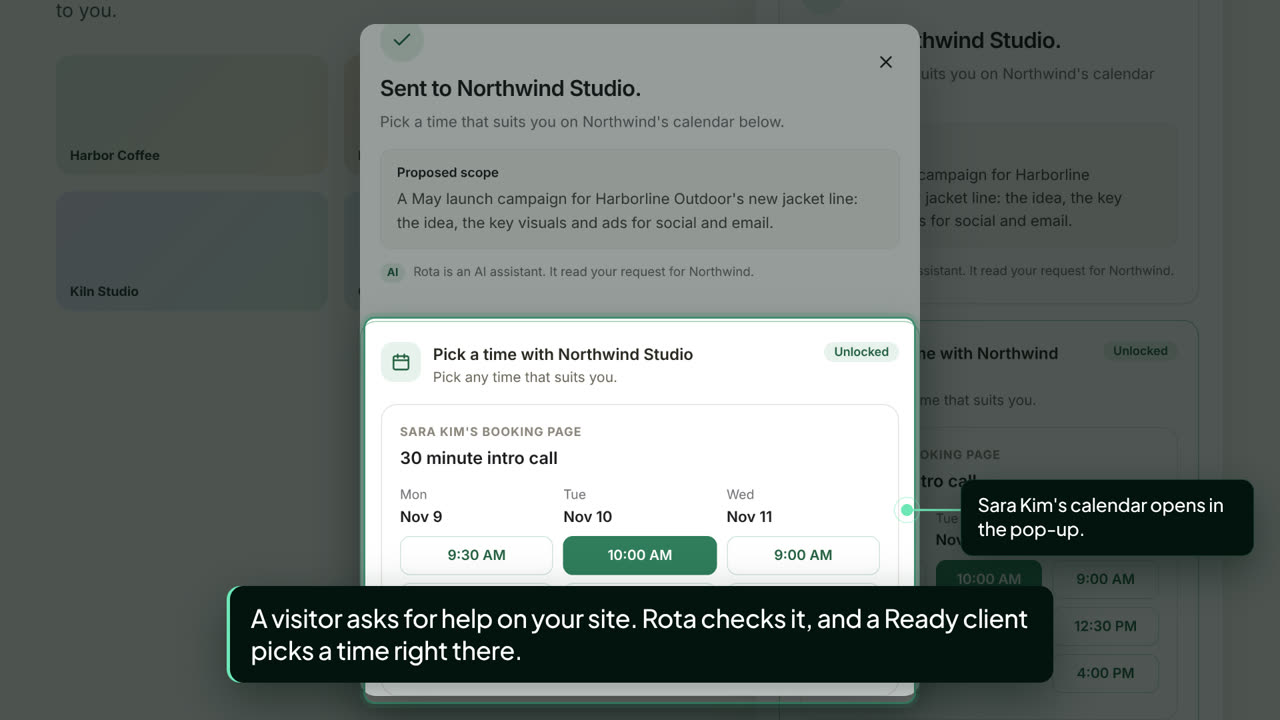
Read what this video shows
A firm wants clients to send requests right from its own website. The request form can sit on the firm's page where the contact form is now, or the firm's own Book a demo button can open it as a pop-up that fills the screen on phones. In the form, Rota, an AI assistant, asks the client a few quick questions, then shows the proposed scope in plain words, and a Ready client picks a time on the firm's calendar without leaving the site. To set it up, the firm copies one line of code that never needs updating, and its Share page lists every site where the form is live, with a Block button for each. If the firm uses Google Tag Manager, Ready requests can count as conversions, and no names, emails or answers are sent.
Read what this video shows
A firm gets client requests that leave out key details. When a client writes in, Rota, an AI assistant, asks a few quick questions about what is missing. The firm sets its rules once: the services it offers, a minimum budget, when work can start and where its clients are, and a lead that misses a rule comes to the firm to decide instead of being turned away. Each request then lands as Ready, Needs info or Not a fit, with the reason, while sales pitches, job seekers and spam go to Filtered and can be restored with one tap. The firm has the last word and can change any verdict with one tap, and changing it never contacts the client.
Read what this video shows
A firm needs each new lead to reach the right person and get a fast reply. Rota, an AI assistant, names the service a lead needs, and the lead goes to the next person in turn for that service, with the reason and where it came from, and it can be reassigned with a note. With Slack connected, new leads post in one channel with the verdict, the service and who has it, but no client names or emails. Rota drafts each reply in the firm's own tone, and the person on the lead reads it, edits it and sends it. A clock counts only working hours, so a lead with no answer after one working hour is marked Needs a reply and moves to the top of Leads, where an admin can step in.
Read what this video shows
Once a client is Ready, the firm wants the call booked with the person who will do the work. A Ready client picks a time right away on that person's calendar, on the firm's request page or in the pop-up on the firm's website. With automatic handoff on, Rota, an AI assistant, sends Ready clients the calendar link as soon as it finishes, and if no one books, a nudge with the booking link is drafted for the firm to send. When the firm connects Calendly or Cal.com, booked, moved and canceled calls show on the lead, and the booking link can be sent again after a cancellation. After the call time, the lead asks if the client showed up, and if they did, it offers the next step: a proposal.
Read what this video shows
After a client comes to the call, the firm can send a proposal right from the lead. The proposal starts from the client's request and the firm's starting price, and the firm edits the work, the price, an optional deposit, a start date and how long the offer stays open. The client reads it on their own request page, then accepts and pays the deposit by card on Stripe's page, or declines. The deposit goes straight into the firm's Stripe account, EliteReply takes no cut, and the firm sees it paid on the lead. The firm can refund the whole deposit, and if the client has not answered, a nudge is drafted for the firm to send once.
Read what this video shows
When a firm finishes work for a happy client, a ready-made referral ask is drafted for the person who did the work to read and send. The client gets a page to send a friend by their own email or text, and EliteReply never sends it for them. The friend books with the person who did the work, the lead lands Ready with the client's name and note on it, and Slack tells the firm about the booking. The firm can also add past clients by pasting them, uploading a CSV or picking from Google Contacts, and Rota, an AI assistant, drafts an ask for each one, a few at a time. Review asks are drafted too, and the firm can see what referred clients agreed to and the deposits they paid.
Read what this video shows
Sometimes a client asks a firm for work it doesn't do, so the request lands Not a fit, with the reason. Rota, an AI assistant, drafts a kind no, and under it the team member can name a trusted partner and add one line on why. The client sees exactly what would be shared and says yes or no, and nothing is shared unless they say yes. If the client says yes, they land on the partner's page with the request filled in and marked as an intro from the firm, and nobody gets paid for it. In Settings, the firm keeps up to three partners and can see how fast each one replies.
Read what this video shows
A firm wants its whole team in EliteReply while keeping client details private. Everyone sees the firm's leads, but only the person assigned to a lead and the admins see the client's name and email. An admin invites people by email as members or admins, can see open invites and who is away, and can work any lead, with each message saying who it is for. Only an admin can let AI assistants such as Claude or ChatGPT send replies for the firm, and the Team plan can be tried free for 14 days with no card. Calendar and Slack tokens are encrypted, card details go to Stripe and never to EliteReply, and EliteReply staff need an authenticator code for any admin tool.
Read what this video shows
A firm already uses tools like calendars, Slack and AI chat assistants, and EliteReply connects to them. Calendly and Cal.com bookings, including moved and canceled calls, show on the lead, and Google Calendar or any booking link that starts with https:// works too. Slack posts new leads in one channel and tags the person who has each one, and HubSpot gets each lead with its verdict and reason. In ChatGPT or Claude, the firm can ask which leads need a reply and get a draft from Rota, an AI assistant, but nothing sends until an admin turns sending on, and even then it asks first. Stripe takes client deposits by card straight into the firm's account, Google Contacts lets the firm tick past clients to ask for referrals, and Gemini and Copilot are coming soon.
Take The 1-Minute Tour
Play the client and the pro, side by side. Watch one vague message become a qualified, booked client. 6 clicks, about a minute, no sign-up.
 Client's screen · Tess Dawson, Brightside Agency
 Kate Russo
Finance consultant for agencies
What can Kate help you with?
We need help with our finances, things are a bit of a mess. Can we talk?
Looks good
Your EliteReply · Kate Russo, solo consultant$3,000, under your minimumNeeds info
Asked for free adviceNot a fit
Filtered today: 2 sales pitches, 2 job seekers. They still count toward your plan.
Turn a vague request into a booked client
You play the client and the pro. 6 clicks, about a minute.