Turn High-Intent Website Visitors Into Scoped, Qualified Client Calls
Don't lose serious buyers to static contact forms or spend partner hours on poor-fit inquiries. EliteReply checks scope and budget right away, books the clients who fit, and sends everyone else to the right person on your team with a drafted reply.
EliteReply Ready lead: Launch campaigns. Assigned to Jon Park. Clock: 60 min.
Live demo: a request is routed, answered in 14 minutes and booked.
Works with the tools you already use
ChatGPT
Claude
Google Calendar
Outlook
Calendly
Cal.com
Slack
HubSpot
Stripe
WordPress
Wix
Squarespace
Webflow
Framer
Shopify
GoDaddy
Google Sites
Google Tag Manager
ChatGPT
Claude
Google Calendar
Outlook
Calendly
Cal.com
Slack
HubSpot
Stripe
WordPress
Wix
Squarespace
Webflow
Framer
Shopify
GoDaddy
Google Sites
Google Tag Manager
70%
of visitors abandon static contact forms.
Baymard Institute; Zuko Analytics
69.9%
of people preferred the adaptive form in a controlled trial.
Frontiers in Digital Health
3.5x
higher lead conversion than static forms (4.9x on mobile).
500-site A/B tests
Nearly 7x
more likely to qualify the lead when a firm answers inside the hour, compared with an hour later.
Harvard Business Review, 1.25 million leads at 42 companies, 2011
Research shows adaptive AI forms (like EliteReply) beat static forms in preference, accuracy, and conversions, whereas static forms see 67%–70% abandonment (Baymard Institute; Zuko Analytics).
How it works
From Widget To Deposit, With Nobody Dropping The Ball
Step 1
Qualify Every Request
Your request page and website widget ask the firm’s questions. When a request is vague, Rota asks up to three follow-ups and writes a proposed scope. Every lead lands as Ready, Needs info or Not a fit, with the reasons.
Spam, pitches and job seekers filtered out
Minimums and services applied for the whole firm
Proposed scope on every Ready lead
Routing rules
Website and brandSara Kim
Launch campaignsJon Park
VideoPriya Shah
Anything elseAisha Bello, firm admin
New lead routed to Jon Park in 40 seconds
Step 2
Route It In A Minute
Each request goes to the person who handles that service. Everyone sees the firm’s leads. Only the assigned person and admins see contact details.
For example: Requests from your request page or website widget used to sit in a shared inbox until someone claimed them. Now each one goes to the person who does that work, and a one-hour clock starts. Watch it · 2:50
Rules by service
Reassign in one click
Omar Reyes, Launch campaign42m left
#new-leads9:13 a.m.
EliteReply Ready lead: Launch campaigns. Assigned to Jon Park. Clock: 60 min.
Slack gets the verdict, the service and the assignee. Never the client’s name, email or words.
Step 3
Answer Inside The Hour
A one-hour clock runs on every lead, and Slack posts every new lead to your channel, with its verdict. Rota drafts the reply with the firm’s price.
Clock visible to the whole team
A Slack post for every new lead
Proposal for Omar ReyesFrom Jon Park
Launch campaign, 10 weeks$24,000
Deposit due today$7,200
Accept and pay deposit
Accepted. Deposit paid to the firm’s Stripe account.
Step 4
Get Paid On Acceptance
After the call, Rota fills in a proposal from the request. The client accepts and pays the deposit in one step, through Stripe.
Deposits paid through Stripe
Accepted proposals counted in dollars
Team controls
Everyone Answers Fast. Nobody Sees What They Shouldn’t
Launch campaign for MayReady
NameHidden
EmailHidden
Only Jon and admins see them.
Who sees what
Everyone sees the firm’s leads. Only the assigned person and admins see the client’s name and email. Firm admins also export CSV and manage people.
Rota's draft
ToMarcus Bell
Thanks for the details. A short call is the best next step. Here are two times this week.
EditSend
Replies in the firm’s voice
Rota drafts with the firm’s prices, services and tone. Each person sends their own.
Which leads need a reply today?
Two: Omar Reyes is Ready, and one needs info.
ChatGPT and Claude
Ask which leads need a reply today, in the chat you already use. Sending is a separate switch.
TUE17
Call booked10:00 AM · Marcus Bell
Ready clients pick a time themselves.
Booking on the right calendar
Google Calendar, Outlook, Calendly or Cal.com, per person.
Built for client data
Calendly and Cal.com keys and Slack tokens are encrypted with AES-256-GCM. Card details go to Stripe, never to us. EliteReply staff need an authenticator code to reach any admin tool.
AES-256-GCM for Calendly, Cal.com and Slack
Cards stay with Stripe
Authenticator code for every admin tool
Referrals
Every Finished Project Asks For The Next One
Firms win most of their work from clients who say so. Rota makes sure every client gets asked.
For example: Jon runs a client's website project. When it's marked done, the ask is drafted for Jon to send, and the friend the client sends books with Jon. Watch it · 2:36
When the work is marked done, the referral ask is drafted for you, from the person who did the work.
Referral askProject done
From Jon ParktoMarcus Bell
Pricing page rewrite
Rota is drafting the ask for Jon to send
Import them once. An ask is drafted for each client the firm never asked.
Past clients
Imported once. Nothing goes out until you send it.
Drafts ready (2)
Sara Kim to Lena ParkSend
Priya Shah to Ana RuizSend
Once the work is marked Completed, the review request is drafted for you.
Review askDrafted by Rota
From Jon ParktoMarcus Bell
Thanks again for trusting us with the pricing page. If it helped, a short review would mean a lot. Here's the link.
Drafted once the work was marked Completed.
SendEdit
It goes to whoever did the client’s work, and the credit counts for the firm.
New leadReady
Omar ReyesReferred by Marcus Bell
Assigned toJon Parkwho did Marcus's work.
Booked: Thu 10:00 a.m. on Jon's calendar
The credit counts for Northwind Studio.
Every ask is drafted. A person on your team sends it. What referred clients agreed to shows in dollars, from accepted proposals only.
Partner referrals
Send The Work You Don’t Take To A Firm You Trust
Turn every Not a fit into goodwill that comes back.
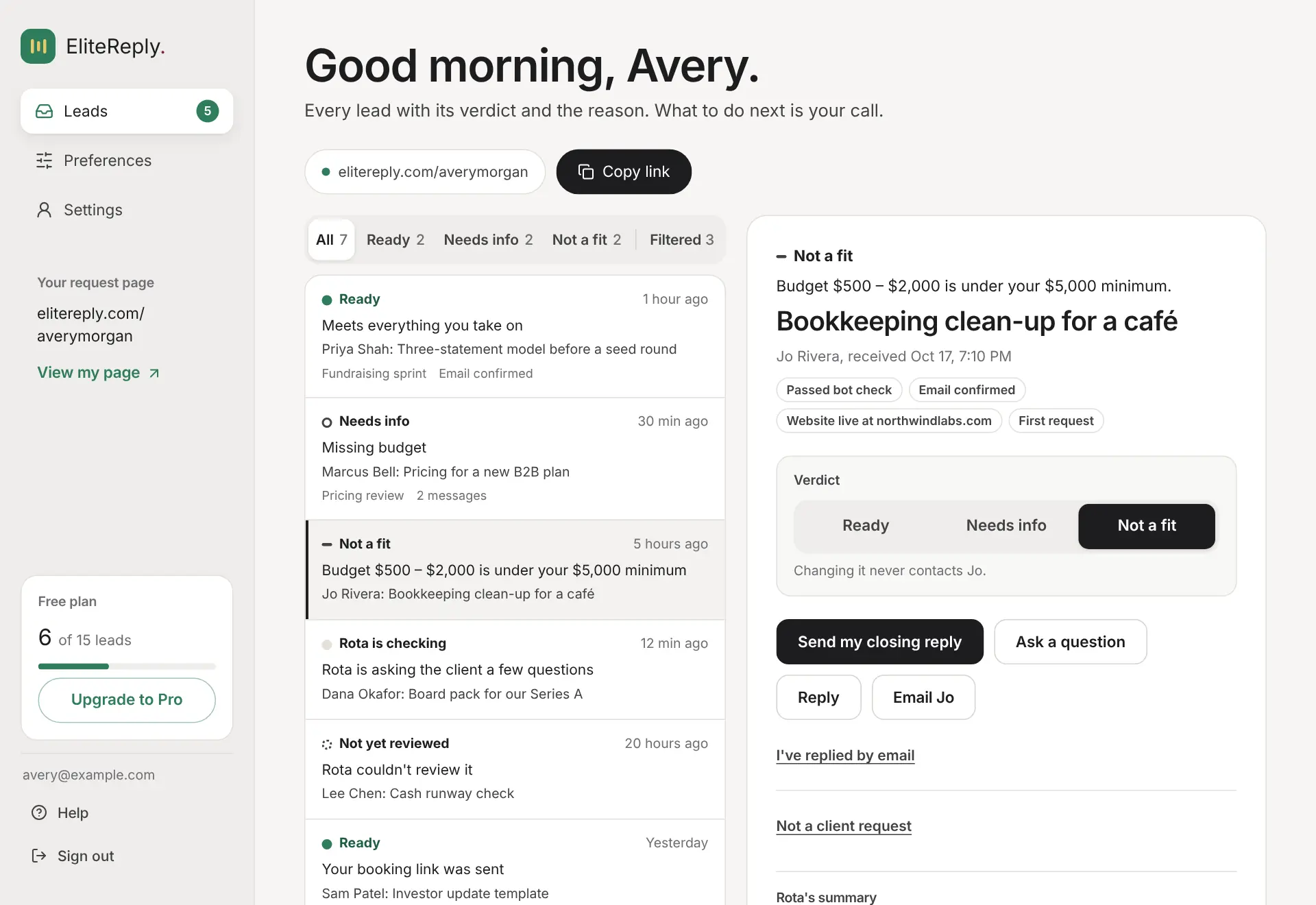
New requestNot a fit
Bookkeeping for a café
FromJo Rivera
ServiceBookkeeping
AssignedNot routed
Rota’s reason: the firm doesn’t do bookkeeping.
Rota’s replyTo Jo Rivera
Thanks, Jo. Bookkeeping isn’t work we take on. For monthly books, we work with Maya Kline. Want an introduction?
Introduce meNo thanks
Nothing goes out until you send it.
Jo Rivera’s answerIntroduce me
Jo Rivera chose to be introduced
Maya Kline gets Jo’s request
Nothing was shared before Jo said yes.
Partner referralsMaya Kline
SentJo Rivera
Maya repliedIn 2 hours
Showed upYes, call held
Nobody gets paid for an intro.
Pricing
One Plan For The Whole Team
$149/month for the firm
Everyone on the team gets everything in Growth. 1,000 leads a month per firm.
14 days free, no card. A notice on day 9, one reminder on day 13. If you add no card, Team turns off and nothing is deleted.
Replies, proposals and referral asks go out only when you send them.
Your clients' details aren't used to train Rota.
Cancel in the app any time.
Questions
Team Questions
Who sees which leads?
Everyone on the team sees the firm’s leads. Only the person a lead is assigned to and firm admins see the client’s name and email, and only they can work it.
What goes to Slack?
The verdict, the service and who it is assigned to. Never the client’s name, email or words.
How does the trial work?
14 days, no card. You get a notice with the price and end date on day 9 and one reminder on day 13. If you add no card, Team turns off and nothing is deleted.
What happens when the one-hour clock runs out?
The lead stays with the assigned person and moves to the top of every firm admin’s list under Needs a reply, and each admin gets an email. Firm admins can reassign it in one click. If there is still no reply after 4 working hours, it moves to the next person in turn (a lead a client referred goes to a firm admin), unless the firm turns that off. The clock counts the firm’s working hours only.
What happens past 10 people?
Talk to us and we will set up the right plan.
Every Lead Answered Inside The Hour
Start with your firm’s website. Routing, the clock and Slack take a few minutes.



 #new-leads







 Marcus Bell